Local Weather Forecast& Widget
- 4.5
- Rating
- 5.00M
- Installs
- Free
- Price
 Analysis by App-foxy
Weather apps are easy to judge too quickly. A clean screen and a current temperature can feel sufficient, but the real test comes when I am leaving home in a hurry, checking conditions repeatedly before a trip, or trying to decide whether a jacket will be useful later in the day. I spent time with Local Weather Forecast& Widget from Life Assistant Studio with that practical question in mind: does it make everyday weather checking quicker and less distracting, or is it simply another forecast shortcut?
My overall impression is that it is built for people who want local conditions available without turning weather into a complicated hobby. It is a free weather app for Android, rated for Everyone, and its current version is 1.5.7. The app has reached over five million installs and holds a 4.5 average from roughly fifty-eight thousand ratings, which suggests that its straightforward approach has found a broad audience.
How the app feels during ordinary weather checks
The first thing I noticed was the app’s uncomplicated purpose. I can open it, look for the information I need, and leave without working through a crowded dashboard. That matters when the question is simple: should I walk now, carry an umbrella, or wait before starting an outdoor task? The experience feels more like a practical utility than a destination for detailed meteorological exploration.
You May Also Like

 Blood Strike: 2.5 Anniversary
Blood Strike’s Loadouts Turn Every Drop Into a Tactical Gamble
A close look at Blood Strike’s custom loadouts: how fast access to signature weapons reshapes its battle royale rhythm, rewards preparation, and narrows the gap between fights.

 Pandora - Music & Podcasts
Pandora’s Music Is Easy to Start, but Harder to Recover
Pandora’s strength is its low-effort path from a seed to a station. Its weak spot is how much confidence it asks you to place in connection, setup, and quiet recovery.

 8 Ball Pool
 Is Built on Rivalries, Rematches, and Routine
A close look at the rivalries, rematches, shared routines, and unanswered safety questions that turn a quick pool match into a persistent mobile community.

 Samsung Music
’s Quiet Strength Is Playing What You Already Own
Its reach comes less from spectacle than from dependable access to a personal library. That simplicity is both the app’s strongest retention engine and its ceiling.

 AccuWeather: Weather Radar
AccuWeather Review: A Quick, Clear Forecast for Everyday Decisions
For everyday plans, the best forecast is the one you can understand quickly. AccuWeather makes rain timing, radar, and local conditions easy to act on, with a few trade-offs.

 Hill Climb Racing
Why Hill Climb Racing Still Turns Crashes Into One More Run
A tiny car, a bumpy hill and one more upgrade: Hill Climb Racing keeps resurfacing because its simple chaos makes every near-miss feel personal.
More From Our News Desk
View All News


Its local focus is especially useful when I move between home, work, and nearby places. A forecast that is generally right for a whole city may still feel unhelpful when conditions change across a short distance. I found the local orientation more valuable than a long list of unrelated locations because it keeps the main decision centered on where I actually am.
The app is free to download and use, while in-app purchases are listed at $4.99 per item. That makes it easy to try without committing money first. I would still approach any optional purchase carefully and decide whether it improves my personal routine rather than assuming that paying automatically makes the forecast more accurate or the app more useful.
Speed expectations when I need an answer quickly
For quick checks, the app’s biggest strength is its narrow focus. I do not have to treat every opening as a research session. When I check the weather before going out, I want the current local view to appear without unnecessary detours, and this app is most convincing in that role.
Perceived speed also depends on the kind of question I ask. Looking for a basic local update is a lighter task than comparing several destinations or studying a longer forecast. Local Weather Forecast& Widget makes more sense for the first situation. If I need a broad planning tool with extensive layers, maps, or specialist information, I would expect a different type of weather service to feel more capable, even if it takes longer to understand.
The widget angle can also reduce the number of times I need to open the full app. A glance from the home screen is useful when I am getting ready in the morning or checking conditions before a short trip. I see this as a workflow advantage rather than a reason to keep refreshing constantly. A widget is most helpful when it supports a decision and then gets out of the way.
One practical tip is to use the app for a small set of repeatable checks instead of treating it as a live control panel. I would look once before leaving, once before a weather-sensitive activity, and again only when conditions are changing. That approach keeps the app useful without making frequent updates feel like a habit that consumes attention or battery.
What happens during heavier use
Weather apps become more demanding when I ask them to do several jobs at once: follow multiple places, provide frequent updates, support a home-screen widget, and remain ready in the background. Local Weather Forecast& Widget is appealing because its main purpose does not require me to build such a complicated setup. The simpler I keep my use, the more naturally it fits into the day.
For someone who checks one location and occasionally uses the widget, I would expect a lighter experience than with an app built around radar exploration, animated maps, travel planning, and many layers of alerts. That does not mean every device will behave identically. Phones differ in available memory, background restrictions, network conditions, and how aggressively they manage apps that are not currently open.
The most realistic heavy-use moment is a busy morning. I might glance at the widget, open the app to inspect the local outlook, switch to another app, and return later before commuting. The benefit here is convenience, but the trade-off is that every added background element can make the phone’s own resource management more relevant. If the widget stops updating promptly, I would check the phone’s battery and background settings before blaming the forecast itself.
Another useful workflow is to avoid keeping several weather tools active for the same location. Running multiple widgets and repeatedly comparing them can create confusion rather than confidence, especially when different services refresh at different times. I would choose this app as my everyday glance tool and keep another source only for occasions when I genuinely need specialized information.
Reliability is more than a current number
I judge a weather app’s reliability in two parts. First, it needs to present local information consistently. Second, it needs to help me understand when a forecast is only a planning aid rather than a promise. Local Weather Forecast& Widget works best when I use it to guide ordinary choices, not to make high-consequence decisions without checking more authoritative or specialized sources.
A current-looking screen can still be misleading if I read it too literally. Weather changes, location accuracy can vary, and forecasts become less certain the farther ahead I look. I would use the app confidently for routine planning, such as choosing clothing or deciding whether an outdoor errand is comfortable, while taking extra care with long drives, severe conditions, flights, or safety-critical work.
The app’s strong rating and large install base give me some confidence that it is approachable and useful to many people, but popularity is not the same as a guarantee for every location or phone. My own experience with any weather tool should include checking whether the displayed place is correct and whether the update feels current before relying on it.
Recovery is another quiet part of reliability. If the widget does not show what I expect, I would first open the main app, confirm the selected location, and check whether the phone has a working connection. If the full app also appears stale, reopening it is a sensible next step. These are ordinary recovery steps, but they matter because a widget can make a problem look like a forecast problem when it may simply be a display or background-refresh issue.
Device constraints and the right kind of user
The minimum operating-system requirement is Android 6.0, so the app is positioned to work with a wide range of Android hardware, including devices that are not recent. That is useful for anyone who wants a dedicated weather tool without buying a new phone. At the same time, older devices may have stricter limits around memory, background activity, and home-screen widgets.
On a modest phone, I would keep the setup simple. One local location, one widget if needed, and occasional manual opening should be easier to manage than a crowded home screen with several live panels. If the phone already struggles with background activity, the convenience of a constantly refreshed widget may not be worth the extra pressure. In that case, opening the app only when necessary is the more sensible compromise.
People who want a calm, direct weather check are the natural audience here. I would recommend it to a commuter who needs a quick morning decision, a parent checking conditions before school activities, or someone who wants local weather visible without learning a complex interface. The Everyone content rating also makes it suitable as a general household utility rather than an app aimed at a narrow age group.
I would be less enthusiastic for users who need deep weather analysis. Outdoor professionals, serious hikers, photographers planning around changing light, and travelers comparing several destinations may prefer a service with more specialized planning tools. The important distinction is not that this app is bad for those users; it is that its value comes from reducing friction, while their needs may require more detail and control.
Everyday scenarios where it earns its place
Imagine I am leaving for work on a morning that looks bright through the window. I check the home-screen widget and then open the app for a closer look at the local conditions. If the outlook suggests that the weather may become uncomfortable later, I can decide whether to bring an extra layer or change the timing of a walk. The app does not need to organize my entire day to be useful; it only needs to make that small decision easier.
A second scenario is an outdoor household task. I may want to wash a car, take a child to a park, or start a short gardening job. Rather than relying on the appearance of the sky at that exact moment, I can use the local forecast as one piece of context. If the task is flexible, a quick check can help me avoid beginning at an inconvenient time.
There is also a travel boundary to keep in mind. For a short trip within the same area, a local weather view may be enough. For a journey crossing regions, I would add the destination manually if the app supports the locations I need, but I would not assume that a home-focused widget is the best planning method. A travel-oriented weather service may be better when I need a sequence of locations, route timing, or detailed destination comparison.
Where it is better than usual alternatives—and where it is not
Compared with the weather panel already built into many phones, this app’s appeal is having a dedicated place for local checking and a widget-centered routine. Some users will find that more convenient than relying on a system panel they rarely open. The trade-off is that another installed app can feel unnecessary if the built-in option already gives enough information and updates reliably.
Compared with large weather platforms, Local Weather Forecast& Widget feels less intimidating. I prefer that when I only need an answer, not a collection of maps and specialist readings. A larger service becomes the better alternative when I need richer visual detail, more advanced alerts, or extensive trip planning. Choosing between them depends on whether simplicity or depth is the actual problem I am trying to solve.
Compared with checking a browser or search engine, a dedicated widget is faster for repeated local glances because it keeps the information close at hand. The downside is that a widget can become background clutter if I do not use it. I would place it where it supports a real routine, not simply because the phone allows another panel.
The free entry point is another advantage over paid-first tools. I can test whether the local view and widget fit my habits before spending anything. The $4.99-per-item purchase level means I would inspect the optional extras with a clear question in mind: does this remove a real annoyance for me, or am I paying for information I will rarely use?
Stability, friction, and how I would set it up
My preferred setup would be deliberately modest. I would start with the main local location, use the widget only if I actually want at-a-glance information, and observe how well it fits my phone’s normal battery and background behavior. This gives me a clean baseline. If something later feels slow or stale, I can identify whether the issue comes from the app, the widget, the connection, or the device’s own restrictions.
I would also avoid judging the app after one unusual weather check. A temporary network problem or a phone that has paused background activity can make any weather tool appear unreliable. Reopening the app, confirming the location, and checking the update again gives a fairer impression. If the same problem repeatedly returns, that is a meaningful limitation for my particular device, even if another phone behaves normally.
The app’s current version, 1.5.7, is relevant mainly because users should keep expectations tied to the version they install. Interface details and behavior can change over time, so I would not assume that a tutorial made for an older release matches what appears on screen. The sensible approach is to learn the app’s current layout through a few normal checks rather than depending on outdated instructions.
One non-obvious trade-off is the relationship between convenience and certainty. The easier a widget makes checking conditions, the more tempting it becomes to glance at it without considering how old the information might be. I treat the widget as a prompt to open the full app when the decision matters. That small habit makes the convenience safer and prevents a tiny home-screen summary from carrying more authority than it deserves.
My performance verdict
After using it as a practical local weather companion, I see Local Weather Forecast& Widget as a good fit for people who value quick access, a simple routine, and a home-screen glance. Its strongest performance is not about overwhelming me with information; it is about helping me answer ordinary questions with minimal effort. The developer, Life Assistant Studio, has aimed the experience at a broad audience, and the Everyone rating matches that accessible role.
I would install it on an Android phone running 6.0 or newer when I wanted a free, focused weather option and did not need a specialist forecasting workspace. I would keep the widget restrained, verify the location, and use the full app when a decision depended on a fresher or clearer view. That setup gives the app the best chance of feeling responsive without asking the device to do more background work than necessary.
It is not the right choice for every weather user. If I needed advanced forecasting tools, detailed travel preparation, or information for safety-critical outdoor work, I would look beyond a lightweight local utility. I would also skip it if my phone’s built-in weather panel already meets my needs and I do not want another widget or app to maintain.
For everyday decisions, though, the balance is convincing. The app is free to try, widely used, and simple enough for a quick check before I step outside. My recommendation is strongest for commuters, families, and casual users who want local weather close at hand without turning a basic forecast into a complicated project.
FAQs for Local Weather Forecast& Widget
01What features does the Local Weather Forecast & Widget app offer?
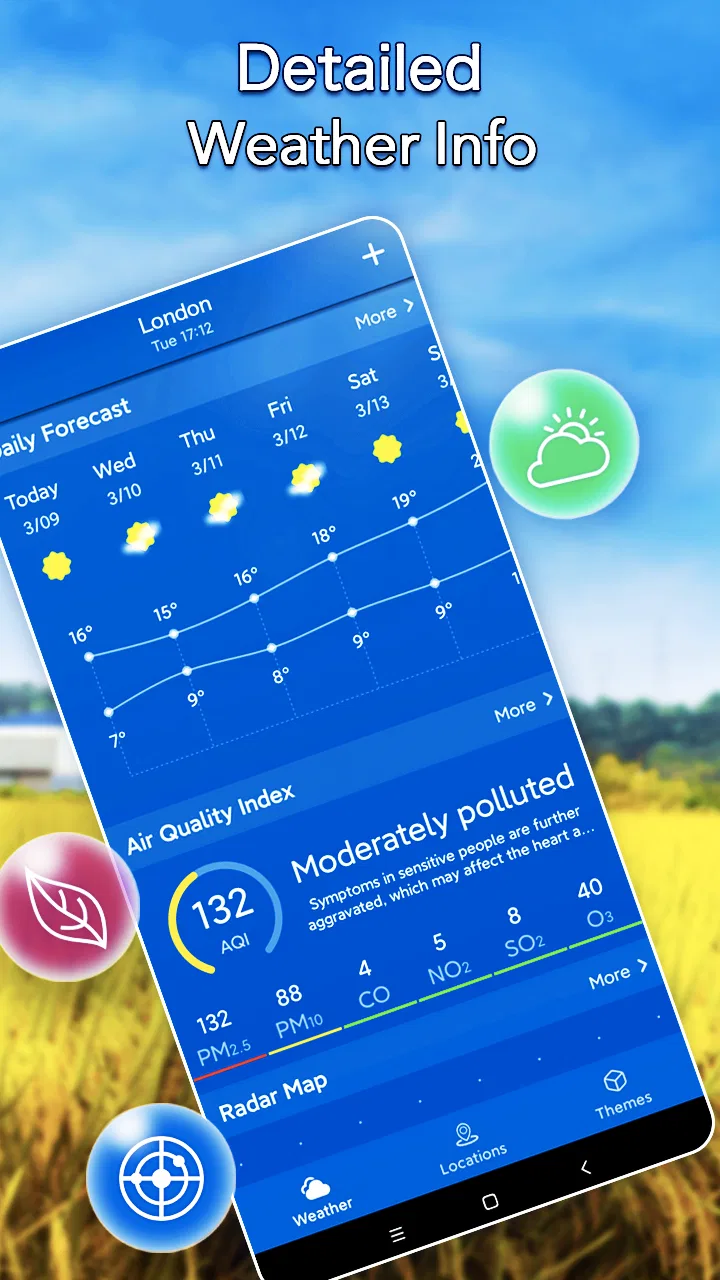
The Local Weather Forecast & Widget app provides real-time weather updates, including temperature, humidity, wind speed, and forecasts for upcoming days. Users can customize their home screen with a range of widgets displaying different weather parameters. Additionally, the app offers severe weather alerts and radar maps for a comprehensive weather overview.
02Is the Local Weather Forecast & Widget app free to use?
Yes, the app is free to download and use. However, it may offer in-app purchases for premium features such as ad-free experience, advanced radar options, and exclusive weather insights. Users can enjoy the basic features without any cost, making it accessible for everyone.
03How accurate are the weather predictions in this app?
The Local Weather Forecast & Widget app uses data from multiple reliable sources to provide accurate weather predictions. While no weather app can guarantee 100% precision, users generally find its forecasts to be highly reliable for both short-term and long-term planning. Regular updates ensure the information remains current and accurate.
04Can I customize the widget settings to fit my preferences?
Yes, the app allows extensive customization of its widgets. Users can choose from various sizes, themes, and data points to display. Whether you want a minimalistic look or a detailed weather report on your home screen, the app offers flexibility to meet diverse user preferences.
05Is the Local Weather Forecast & Widget app available for both Android and iOS devices?
Absolutely, the app is available for download on both Android and iOS platforms. Users can find it on the Google Play Store for Android devices and the Apple App Store for iOS devices. It is designed to function seamlessly across different operating systems, providing a consistent user experience.
Pros
- Accurate real-time weather updates.
- Customizable widgets for home screen.
- Supports multiple locations for tracking.
- User-friendly interface with clear icons.
- Detailed forecasts including humidity and wind.
Cons
- Ads can be intrusive at times.
- Some features require a premium upgrade.
- Occasional lag in widget refresh.
- Limited radar functionality.
- Battery usage can be high with GPS on.

Local Weather Forecast& Widget
Gallery